Developing with Maquina
What is Maquina?
Maquina is the 3d application framework on which Rumba and Guerilla Render v3 are built.
What can I do with this Maquina?
You can run Python commands live in Rumba using the Script Editor.
New node types can be created with plug-ins in Python or C++.
You can also customize the graphic user interface with your own commands using Python.
The Maquina Model
The Maquina model is a pure direct acyclic graph composed of nodes, plugs and connections. The plugs may contain or compute values.
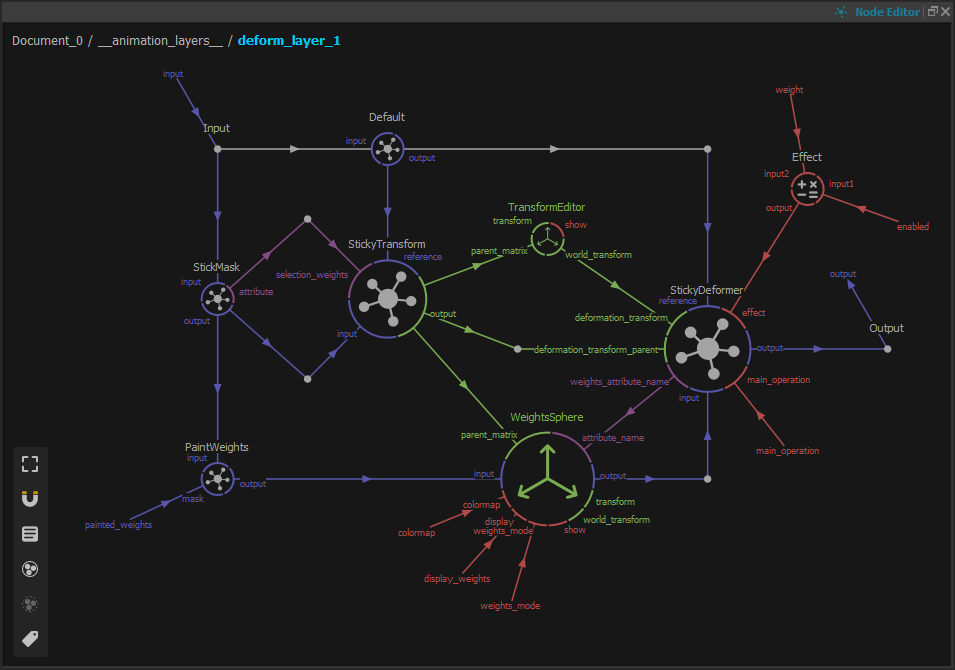
A part of a Maquina direct acyclic graph, here the graph of a deformer visualized in the Maquina node editor.
Running rumba in dev mode
A developer might want to run Rumba in a developer environment. We recommand to run rumba (or rumbabatch.exe on Windows) in a terminal using those options:
rumba -f dev -l trace
Rumba will include a node editor to help visualize the graph and a node list option to display the content of the whole framework nodes (and not only the document node’s).
This command will also generate verbose logs.
Setup some environment variables
Some interesting environment variables you might want to set as a Rumba developer:
You also might want to disable the crash reporter when you develop plug-ins : * RUMBA_NO_CRASH_REPORT